Flashcard Buddy for parents

A study system your child can use. A clear view of how it is going.

Turn class materials into focused study sessions, add live help when your child gets stuck, and receive a report after each tutoring lesson. Built for grades 3 through 12.

No credit card for the free lesson. No child email required for a parent-managed learner.

Parent and student using Flashcard Buddy together
Study tools for the daily work. Live tutoring for the moment the work stops.
Grades 3-12 Age-aware help
15 minutes Free live tutoring
No child email Parent-managed setup
No overages Prepaid tutoring time

One parent account, clear boundaries

They get room to learn. You keep the account controls.

Your child should be able to ask a question without opening your billing page or changing account settings. Parent-managed tutoring keeps those jobs separate.

Your child can

Focus on the lesson

  • Start live tutoring from a paired phone or tablet.
  • Talk through the exact question or upload a worksheet image.
  • Write on the shared board and answer understanding checks.
  • Review their own lesson history on that device.

You control

The parent side of the account

  • Consent, billing, tutoring time, and report preferences.
  • Short-lived pairing codes and the list of connected devices.
  • One-click device revocation without changing your password.
  • Lesson reports, saved whiteboards, and suggested next steps.

How parent setup works

Set it up once. Hand off the learning, not your account.

  1. 1

    Create your account

    Use your email and keep billing, privacy settings, and reports under your control.

  2. 2

    Add the learner

    Enter a first name or nickname, grade, timezone, and any learning context Max should know. Children under 13 use this parent-managed path.

  3. 3

    Pair their device

    Open a one-time QR code and scan it with the student's phone or tablet. The code expires after one minute and works once.

  4. 4

    Start learning

    Create flashcards from school materials or start a live tutoring lesson. After tutoring, the report returns to your account and email.

A complete study loop

Less time organizing. More time remembering.

Flashcard Buddy turns notes, PDFs, photos, and pasted text into editable flashcards. The study system brings back harder cards more often, then Max Live steps in when repetition is not enough.

Make the deck

Upload class material or type the topic. Review every card before studying.

Practice the right material

Study, Learn, Practice Test, and Write modes give the student more than one way to retrieve the answer.

Return before they forget

Spaced review schedules cards around what the student remembers and what still needs work.

Talk through the hard part

Live voice tutoring uses a shared whiteboard and fresh questions instead of dropping an answer into the chat.

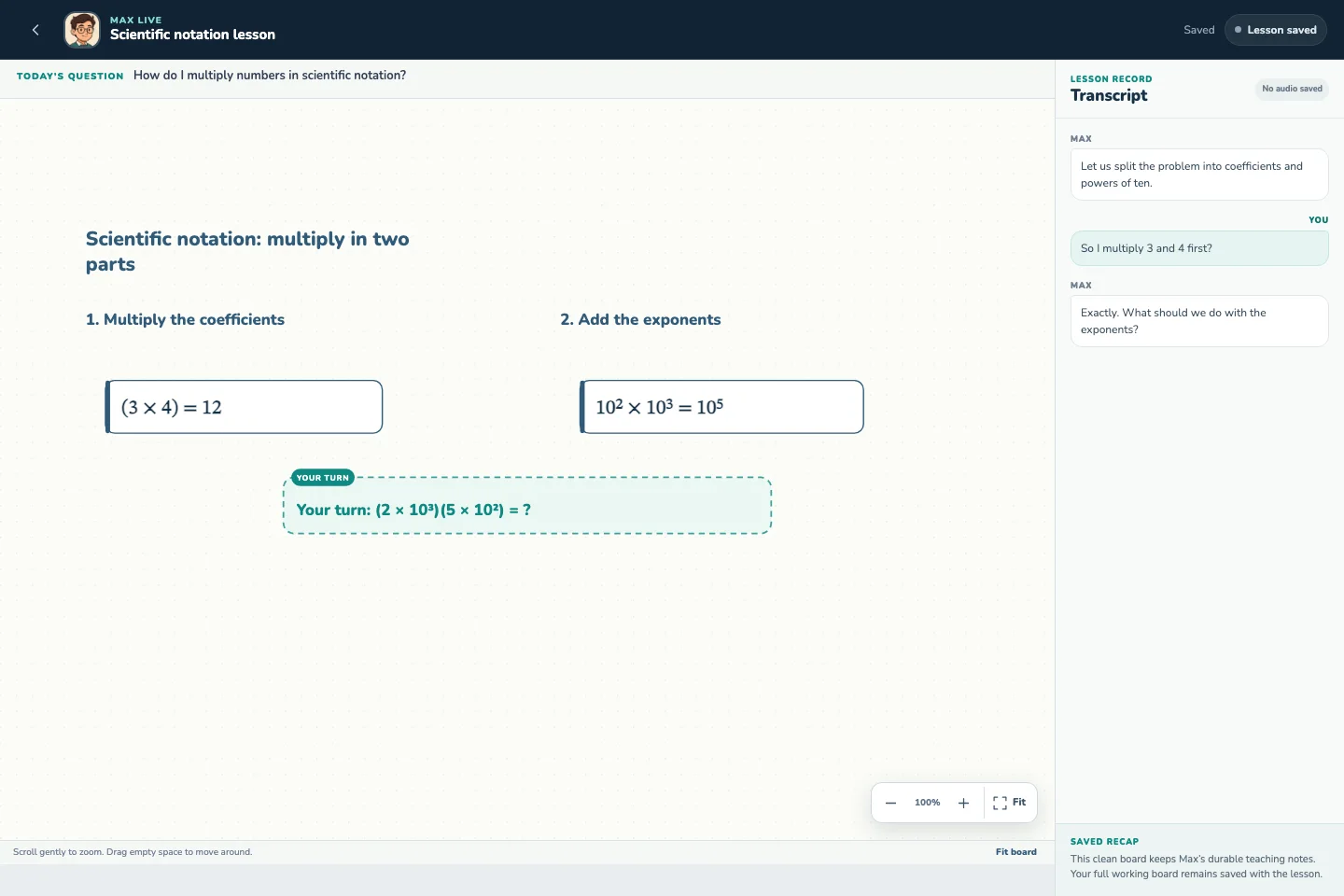
Live tutoring lesson on the shared whiteboard
The student hears the explanation, sees each step, and does their own work on the same board.

Tutoring when homework stops

Max teaches the next step, then checks whether it stuck.

Your child can ask for help at the point of confusion instead of waiting for an appointment. Max listens, uses the board, asks focused questions, and pauses for an answer.

  • Grade-aware language. Explanations and examples match the learner's grade and saved context.
  • Active participation. Max asks the student to explain, choose, write, or solve before moving on.
  • Bounded time. The remaining allowance is visible, and Max never creates an automatic usage overage.
  • A supporting role. Max helps between school and human tutoring sessions. It does not replace a teacher or qualified tutor.
See how tutoring works

After the lesson

Know what they worked on without listening at the door.

Flashcard Buddy emails the account holder after a completed lesson. The same report stays in the parent account for later review.

Lesson report

Sam practiced multiplying numbers in scientific notation.

18 minutes

What clicked

Sam correctly multiplied the coefficients and explained why the exponents are added.

Still needs practice

Moving the decimal when the coefficient is greater than 10.

Suggested next step

Ask Sam to normalize one example without help, then review the exponent change together.

Parent pricing

Try tutoring free, then choose how often you need it.

Tutoring time is prepaid. The student cannot run up an overage.

First lesson

Free

15 tutoring minutes once per account, plus Flashcard Buddy's free study tools. No credit card required.

Start free

Drop-in help

$12 once

30 prepaid tutoring minutes that expire after 30 days. No subscription and no automatic refill.

Start with the free lesson

Ongoing support

$39/month

120 tutoring minutes each billing period, plus full access to Flashcard Buddy's paid study tools. Renews until canceled.

Start with the free lesson
Only need the study tools? Compare Full Access plans.

Questions parents ask

Before you set up the learner

Can my child use this without my password?
Yes. A parent can create a one-time QR code for Max Live. The paired device can open tutoring and the learner's lesson history, but it cannot open billing, reports, settings, or the parent profile.
What information do you need about my child?
A first name or nickname, grade, timezone, and any learning context you want Max to know. We do not ask for the child's school, teacher, exact birth date, or full legal name.
What happens to lesson audio?
Flashcard Buddy sends audio to the AI provider during the live lesson and does not save the audio recording. We save the transcript, whiteboard, usage record, and lesson summary so the account holder can review the lesson.
Can I remove a connected device?
Yes. The parent account lists paired devices and can revoke any device session at any time.
Is this only for math?
No. Max Live can help across school subjects when a student needs an explanation, practice, or a way to talk through a difficult idea.
Can an older student manage their own account?
Yes. Students age 13 or older and adult learners can manage their own account. The parent-managed option is available when the parent should control consent, billing, reports, and device access.


Give the next study session a better place to start.

Set up the learner in about a minute and try the first 15 tutoring minutes free.

Set up my child's tutoring